AP Invoice Intake
Your vendors still email PDF invoices. Your AP system probably doesn't read that inbox
Vendors keep emailing invoices, and most AP systems never open that inbox. Auxtri reads it on the same intake layer that already handles your inquiries and statements, then extracts the fields, suggests the vendor match, flags duplicates, and hands your team a review-ready invoice. PO matching, coding, and approvals stay in your ERP, where you already invested.
The Challenge
A vendor emails a PDF invoice to your AP mailbox. Someone on your team opens the attachment, re-keys the header fields, hunts for the right vendor and company code, and hopes it is not a duplicate already in the system. All of that happens before your ERP ever sees the invoice.Your AP team already works that same inbox for vendor inquiries and statements, and Auxtri already reads those. The invoice lands in the same classification layer, moves through the same review workflow, and hands a structured invoice to your ERP. It is one intake layer, not a separate system bolted on the side.
How It Works
Five steps on the same inbox monitor that already powers vendor inquiries and statement reconciliation.
Invoice Email Received
A vendor emails your AP mailbox with a PDF invoice attached, the same mailbox they already use for status questions and statements. Nothing changes on their end.
Classify and Extract
Auxtri classifies the message as a vendor invoice on the same intake layer as inquiries and statements, then extracts the header fields, line items, and remit-to details from the attachment. This is not a separate system.
Suggest Vendor and Company Code
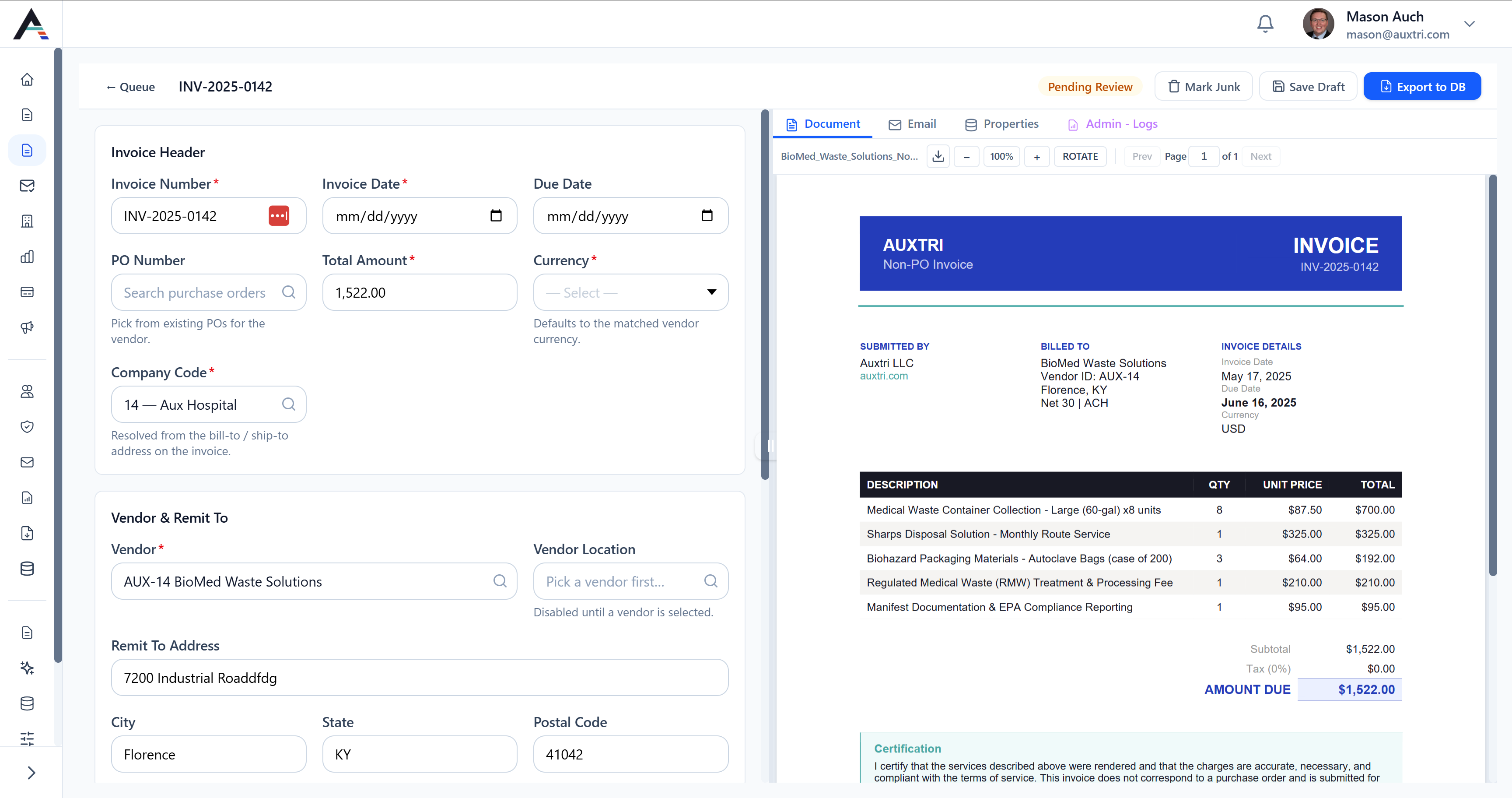
Auxtri suggests the vendor, remit-to location, and company code against your master data, using the sender domain, invoice content, and any PO references on the document.
Flag Duplicates
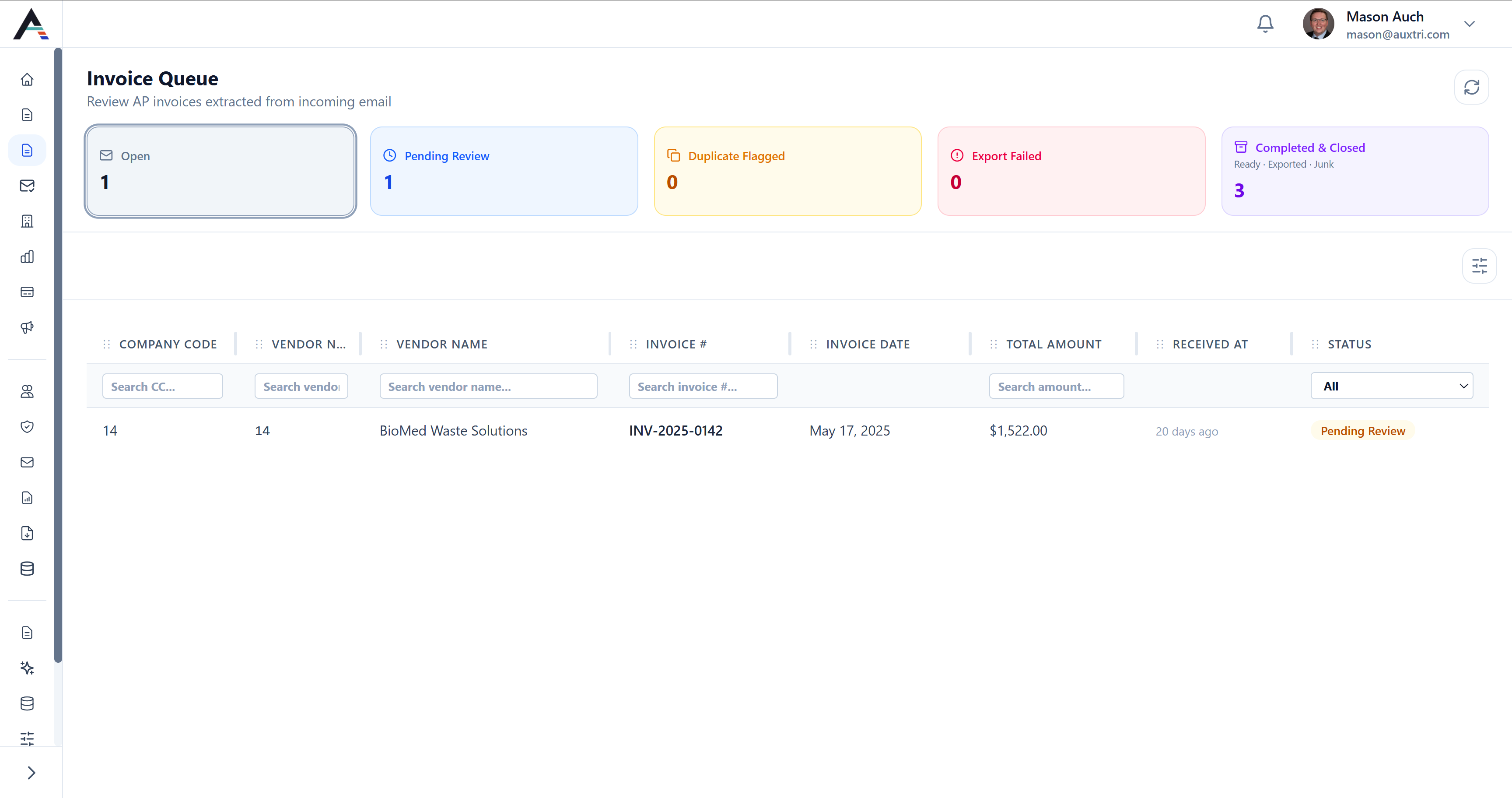
Likely duplicates surface against your existing invoice records, so your team confirms intent before anything moves forward.
Review and Approve
Your AP team reviews and corrects fields in the Invoice Queue, then approves a structured invoice. Nothing reaches your ERP until a person signs off, and PO matching and approvals stay in the ERP.
The Invoice Queue
Every vendor-submitted invoice lands in one review surface with OCR fields, match suggestions, duplicate flags, and line items your team can correct before approval.
We support your ERP. We do not replace it.
Auxtri is not another matching engine sitting beside your ERP. We prepare structured invoice data from the email and attachment. Two-way and three-way PO matching, GL coding, approval hierarchies, and payment execution run in the ERP workflows your finance team already configured. Our job is the intake work that happens before an invoice becomes an ERP transaction.
- Auxtri OCR-extracts vendor-submitted invoice PDFs from email
- Auxtri suggests vendor, remit-to location, and company code against your master data
- PO matching stays in your ERP, not in Auxtri
- GL coding and approval routing stay in your ERP
- Payment execution stays in your ERP
Key Capabilities
Same Inbox Monitor
Vendor invoices arrive in the same mailbox as everything else, so there is no new portal for vendors and no separate system for your team. They are classified on the shared intake layer that already handles inquiries, statements, and vendor master documents.
OCR Field Extraction
Your team reviews instead of re-keying. Header fields, line items, remit-to address, and bill-to details are pulled from the PDF and dropped into the queue for a quick check.
Vendor and Company Code Suggestions
No more guessing at the vendor code. Sender domain, invoice content, and PO references narrow the vendor, location, and company code against your master data.
Duplicate Flagging
Catch the same invoice before it posts twice. Likely duplicates surface before approval so your team can confirm intent.
Human Review on Every Invoice
Nothing reaches your ERP without a person signing off. Every invoice lands in the Invoice Queue for correction and approval first.
Native ERP Connectors
Invoices flow into the ERP you already run. Workday Financial Management, Infor CloudSuite FSM, Oracle Fusion Cloud Financials, and Oracle PeopleSoft use the same connectors as the rest of Auxtri.
Healthcare AP practitioners on your side
Healthcare AP is not a generic software problem. Our support team includes people who have worked in hospital AP and the ERPs you run. We implement in four to six weeks, and we stay with you through go-live so the Invoice Queue reflects how your team actually works.Every support ticket opens inside the product with the page context attached. AP managers and IT can see every ticket across the organization, so nothing disappears into a private email thread.
Common Questions
Does Auxtri handle vendor-emailed invoices if we already have Workday, Infor FSM, Oracle Fusion, or PeopleSoft?
Yes. Auxtri connects to Workday, Infor CloudSuite FSM, Oracle Fusion, and Oracle PeopleSoft through native connectors, so vendor-emailed invoices flow from your AP inbox into the ERP you already run. PO matching, GL coding, and approvals stay in that ERP. Auxtri handles the email intake and hands your team a structured invoice to review before anything posts.
What happens to PDF invoices vendors email directly to the AP team?
Auxtri classifies the message as a vendor invoice on the same intake layer that already reads your inquiries and statements, then extracts the header fields, line items, and remit-to details from the PDF. It suggests the vendor and company code and flags likely duplicates before the invoice reaches your team. Your vendors do not change how they send invoices; they keep emailing the same mailbox.
Is this a replacement for our existing AP automation tool?
No. Auxtri handles the inbox intake layer, the vendor-emailed PDF that lands in your AP mailbox. If you already run a separate capture or approval tool for invoices that arrive through portals or EDI, that tool keeps doing its job. Most AP capture tools focus on portal-submitted or EDI invoices, so Auxtri handles what arrives by email. There is no overlap.
How long does it take to go live with invoice intake?
Implementation runs four to six weeks. Invoice intake uses the same native connectors as the rest of Auxtri, so if you already have other modules live, setup is faster because the ERP connection and your master data are already in place.
Related Capabilities
AP Invoice Intake runs on the same inbox layer as the rest of Auxtri.
The Inbox
Vendor Inquiry Automation
Draft responses to vendor status questions using live ERP data.
The Statement Pile
Statement Reconciliation
Extract every statement line and match against your ERP records.
The Approval Layer
Vendor Master Manager
Turn mailbox change requests into approved, audit-logged ERP writes.
See AP Invoice Intake live
Bring vendor-submitted invoice emails from your AP mailbox. We will process them live and show how the review-ready invoice lands in the Invoice Queue before your ERP workflow starts.