People First
Real healthcare AP people, in your corner.
We built Auxtri because we lived this work. Every customer gets a team that has sat in the same chair, fielded the same vendor emails, and chased the same payments. Software handles the busywork. Our people handle you.
Who You Are Working With
A team that knows the work because they have done the work.
Auxtri started inside healthcare AP, not outside it. Read the founder story for the long version. The short version: every conversation you have with our team is with someone who has felt the same Friday afternoon backlog you have.
Healthcare AP practitioners
The people on our support team have worked in healthcare AP, with healthcare ERPs, and through the same month-end crunches your team faces. The shorthand makes sense to us because it is our shorthand too.
Healthcare ERP fluency
Infor CloudSuite FSM, Workday Financial Management, Oracle Fusion Cloud Financials, and Oracle PeopleSoft are first languages for our team, not phrasebook entries we Google when a ticket comes in.
Partners, not vendors
Your success is the only success metric that matters here. We measure ourselves on whether your team is ahead of the work, not on how many tickets we closed this week.
Support Where You Work
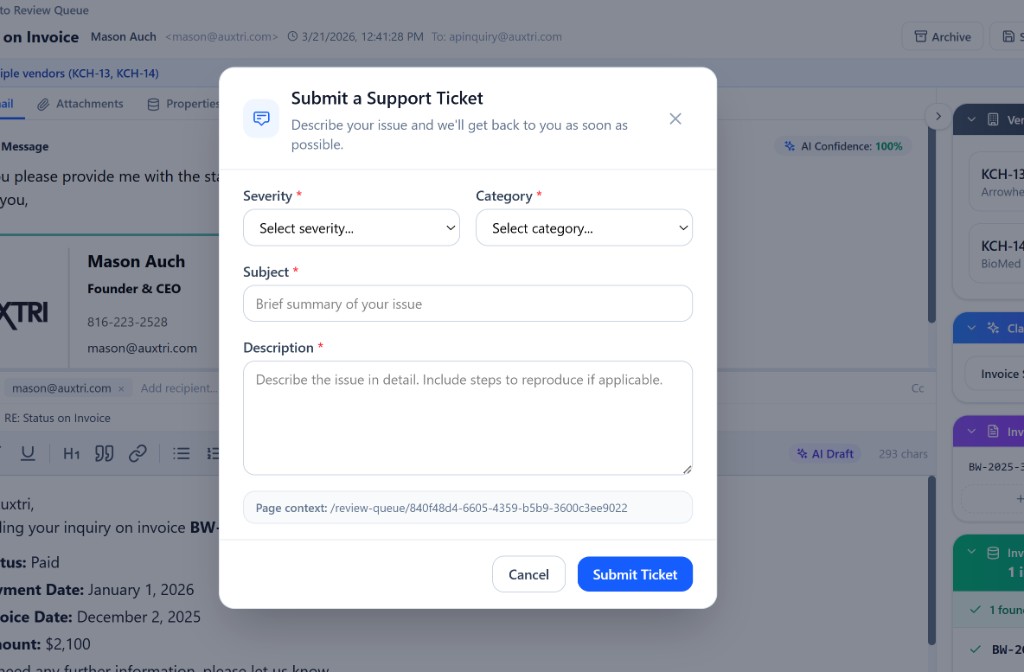
Ticketing is built into the application.
No portal to log into. No support email address to find. No copy-paste of the URL you were looking at. Anyone on your team can open a ticket from any page in Auxtri, and the ticket already knows where they were and what they were doing.
That context lands with our team in seconds, so the first reply is a real answer instead of a request for more information.
- Page context captured automatically. We know exactly which screen, record, and workflow the ticket came from.
- Severity and category at the point of submission. The right person on our team picks it up first, every time.
- Tied to the user and the tenant. Routing, history, and audit trail are wired in from the first click.
Visibility Across Your Organization
One tenant, one queue, one source of truth.
Support requests do not get stuck in one person's inbox. Managers and IT can see everything their organization has open, in progress, or resolved, so nobody finds out about a problem after it has already festered.
AP Manager view
Managers see every ticket their team has opened, who opened it, what it is about, and where it stands. No more piecing together the story from forwarded emails on Monday morning.
IT and Admin view
IT administrators see the same queue across the entire organization, with the user, tenant, and page context attached. Patterns surface quickly when one team can see all of them.
Audit-ready trail
Every conversation, every status change, and every resolution is captured against the ticket. The same record your team uses day to day is the record your auditors get when they ask.
Communication, Not Surprises
We tell you what changed before you have to ask.
Communication is built into the product on two channels, both visible to your team without leaving Auxtri. You should never have to discover a change by stumbling into it.
In-app Notifications
Real-time updates that affect a specific user or workflow land in the in-app notification center. A reply on your ticket, a release that touches a screen you use, an action that needs your attention. Your team sees it the next time they open the app, no email forwarding required.
Release Notes
Every release ships with a written record of what changed and why. Your team gets a steady drumbeat of improvements they can scan, and your auditors get the paper trail they need without a back-and-forth with us.
What You Can Expect From Us
Partnership commitments, not marketing promises.
These are the working agreements that hold for every Auxtri customer. They are how we show up, on day one and every day after.
A named point of contact
You know who to ask for. They know your team, your ERP, and your workflows.
Fast first response
Tickets do not sit. We acknowledge the request, set expectations, and tell you who is on it.
Transparent escalation
If a ticket needs engineering, you know that the moment it happens. No black box.
No script readers
Every reply comes from someone who actually understands healthcare AP. Period.
Common questions about Auxtri support
The questions we hear most often from AP managers, IT administrators, and security teams reviewing how we operate.
How does Auxtri handle customer support?
Support is built into the application. Anyone on your team can open a ticket from any page in Auxtri without leaving the workflow they are in. Tickets capture the page they were opened from, the severity, the category, and the user, so the Auxtri team picking up the request already has the context they need to help.
Who is on the Auxtri customer support team?
Our support team is staffed with people who have worked directly in healthcare accounts payable and the systems that surround it (Infor CloudSuite FSM, Workday Financial Management, Oracle Fusion Cloud Financials, Oracle PeopleSoft). You are not talking to a script reader. You are talking to someone who has done the work and cares about the outcome.
Can our managers and IT see all support tickets across the organization?
Yes. AP managers and IT administrators have visibility into every ticket their organization has opened, the status of each one, the conversation history, and the resolution. There are no shadow inboxes and no one-off email threads we forget to share. One tenant, one queue, one source of truth.
How does Auxtri communicate product updates and changes?
Two channels, both inside the product. In-app Notifications surface real-time updates that affect a specific user or workflow (a ticket reply, a release that touches a screen they use, an action they need to take). Release Notes publish a written record of what changed in each release, so your team and your auditors always have a paper trail.
Meet the team that will be working with yours.
Bring real questions to a live demo. We will introduce the people who will be picking up your tickets after you sign.