Feature
What is Statement Reconciliation?
Statement reconciliation is the process of matching every invoice on a vendor statement against your accounts payable records to confirm what is paid, what is open, and what is missing. Auxtri extracts every line item from the statement, batch-queries your ERP for status on each one, and produces a reconciled summary in minutes instead of hours.Built for healthcare AP teams running Workday Financial Management, Infor CloudSuite FSM, Oracle Fusion Cloud Financials, or Oracle PeopleSoft. The matching work that used to take thirty to sixty minutes per statement happens in the background, so your team reviews exceptions instead of ticking line items.
The Challenge
A typical health system receives 50 to 100 vendor statements every month. At thirty to sixty minutes per statement, that is 75 to 200 hours of senior AP capacity gone to line-by-line matching, every month.The cost is not just the time. It is the duplicate payments that slip through because nobody can audit every statement, the missing invoices that surface six months later as past-due collections, and the close that drags because reconciliation is not done.
How It Works
Five steps from inbox to reconciled response.
Statement Received
Upload vendor statements in any format, or let Auxtri automatically capture them from your AP email inbox.
Sender and Domain Verification
Auxtri checks the sender against the vendor's known email domains, flags lookalikes and spoofed senders for human review, and scopes the reconciliation to the verified vendor only.
Automated Extraction
OCR extracts every line item from the statement: invoice numbers, dates, amounts, payment references, and balance details.
ERP Matching
Each line is automatically matched against your Workday, Infor CloudSuite FSM, Oracle Fusion, or PeopleSoft invoice and payment records to identify matches and discrepancies.
Reconciled Response Drafted
A reconciliation summary lands in the queue with matched items, discrepancies, and payment status. Your team reviews, edits if needed, and sends the response back to the vendor.
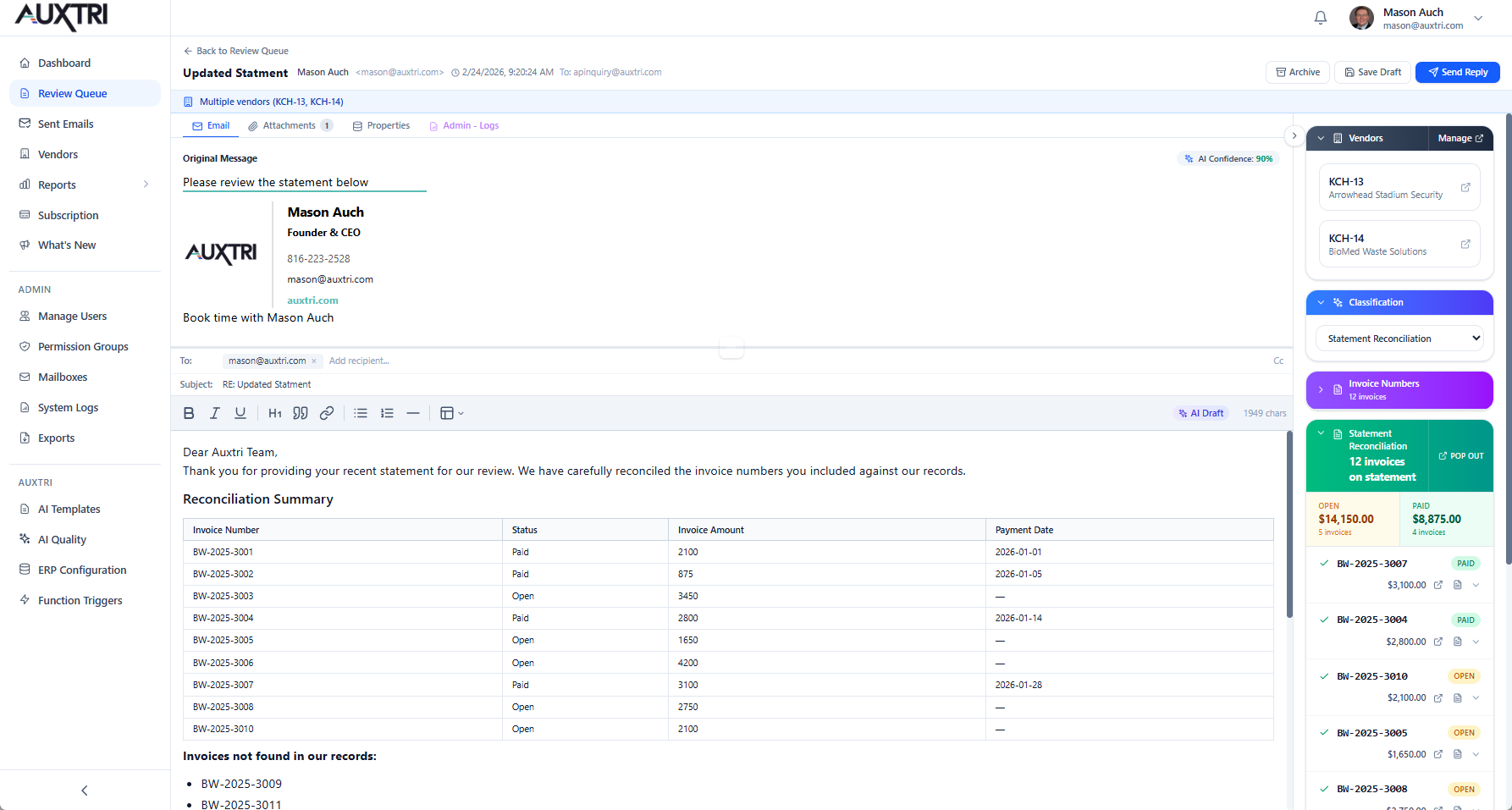
Statement reconciliation with automatic invoice matching
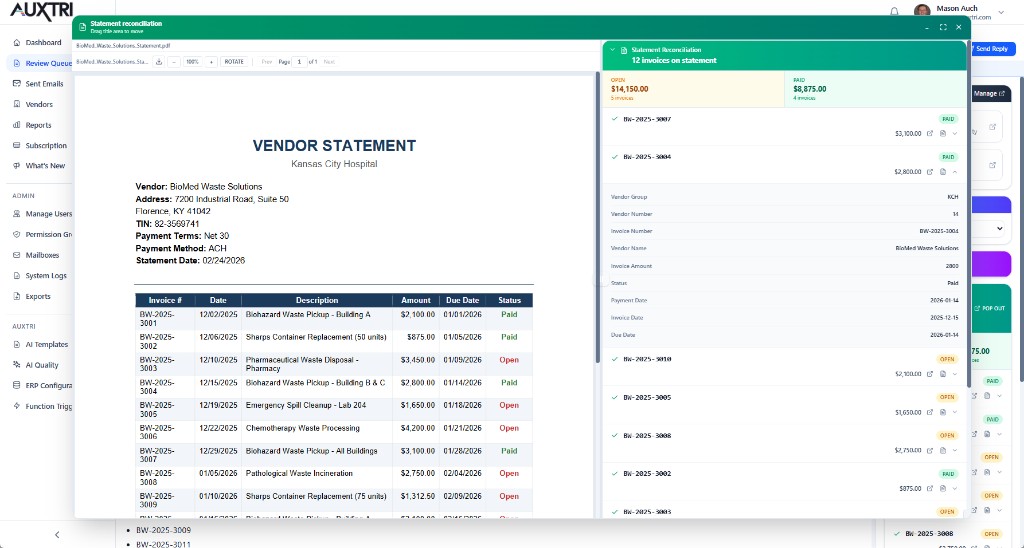
Pop-out the reconciliation panel to compare the original vendor statement against matched ERP invoice data side-by-side.
Key Capabilities
The matching, OCR, and audit support healthcare AP needs to trust an automated statement workflow.
Format-Agnostic OCR
Handles statements in any format: structured tables, unstructured text, scanned documents, and multi-page files.
Fuzzy Matching
Matches invoices even when numbers differ slightly (leading zeros, prefixes) or when amounts have minor variances.
Discrepancy Detection
Automatically identifies missing invoices, duplicate payments, amount mismatches, and date discrepancies.
Sender Verification
Auxtri validates that each statement comes from a legitimate vendor contact and flags lookalike domains, spoofed senders, and phishing attempts for human review before any reconciliation runs.
Export and Integration
Export reconciliation results to Excel, or push adjustments directly back to your ERP system.
Audit Trail
Complete documentation of every reconciliation for compliance and audit purposes.
Expected Results
Healthcare AP backlog reduction, measured.
80%+
Reduction in reconciliation time per statement
2 hrs to 15 min
Per 50-line statement, before to after
100%
Audit-ready documentation for every reconciliation
Related
More on what Auxtri does and how it differs from other automation approaches.
Capability
Vendor Inquiry Automation
Auxtri reads incoming vendor inquiry emails, queries your ERP for invoice or payment status, and pre-populates a draft response your AP team reviews and sends.
Read moreCapability
AP Invoice Intake
Vendor-submitted invoice PDFs from email, OCR-extracted and review-ready before your ERP matching workflow starts.
Read moreCapability
Vendor Master Manager
The same intake layer also turns mailbox change requests (onboarding, bank changes, tax ID updates, COIs) into approved, audit-logged ERP writes. Six modules, independently toggled.
Read moreWhy Auxtri
Auxtri vs RPA
RPA needs a custom script for every statement format and breaks when a vendor changes their layout. See why scripted bots cannot handle statement reconciliation and how Auxtri approaches it differently.
Read moreSee Statement Reconciliation live
Schedule a demonstration to see how Auxtri reconciles a real vendor statement against your ERP. Bring your own samples. We will process them live.